
Blog
WordPress vs Custom Development: Which Is Right for Your Business? (2026 Guide)

Last updated: November 2026
Quick answer: Choose WordPress when your website mainly needs to publish content, explain your services, sell standard products and capture leads; it is faster, more affordable and easy for your team to manage. Choose custom development when your business depends on unique workflows, complex data or several systems that must work together, and consider a hybrid when you need a bit of both.
The useful question is not “WordPress or Laravel?” It is “What must the system do for our customers and staff — today, and two years from now?” A straightforward brochure site and an integrated logistics platform may both need a website, but they are very different projects.
This guide compares WordPress vs custom development from the perspective of a business owner commissioning a new website or platform in the UAE. It also shows how Blue Tech approaches the choice across marketing sites, online stores and operational software.
What WordPress and custom development actually mean
WordPress is an open-source content management system (CMS) with built-in publishing and user management. A site can use a professionally developed custom theme, carefully selected plugins and bespoke functionality. It does not have to use a template or a heavy visual page builder. As of 7 November 2026, W3Techs reported WordPress on 39.4% of all websites in its survey.
Source: W3Techs WordPress usage report (7 Nov 2026)
Custom development means building a product around your specific requirements using reusable software frameworks and libraries. For example, Laravel can power a back end and APIs, while Next.js or React may be used for the web interface. Developers do not necessarily start from zero, but they are responsible for designing the data model, business rules, admin tools and integrations required by the project.
A third option sits between them: custom WordPress development, headless WordPress, or a WordPress marketing site connected to a separate custom application. In practice, this middle ground deserves consideration early.
WordPress vs custom development: at a glance
| Decision factor | WordPress | Custom development |
|---|---|---|
| Best starting point | Content-led company websites, campaigns, blogs, standard stores | Platforms with distinctive workflows or integrated operations |
| Launch speed | Often faster when requirements are standard | Usually needs more discovery, testing and integration work |
| Content editing | Built-in CMS; can use custom fields and editorial roles | Requires a chosen CMS or purpose-built admin interface |
| Bookings and payments | Possible via maintained plugins or custom extensions | Useful when rules and transactions are highly specialised |
| SEO | Established tools; implementation quality still matters | Full flexibility; SEO must be planned and tested |
| Security | Core, plugins, themes and hosting need active maintenance | Application, dependencies, infrastructure and access need active maintenance |
| Scalability | Can scale with sound architecture and hosting | Can be tailored to specific scale and performance constraints |
| Cost of change | Standard edits are often simpler; custom changes can still be costly | Enhancements usually involve specification, development and QA |
When WordPress is the right choice
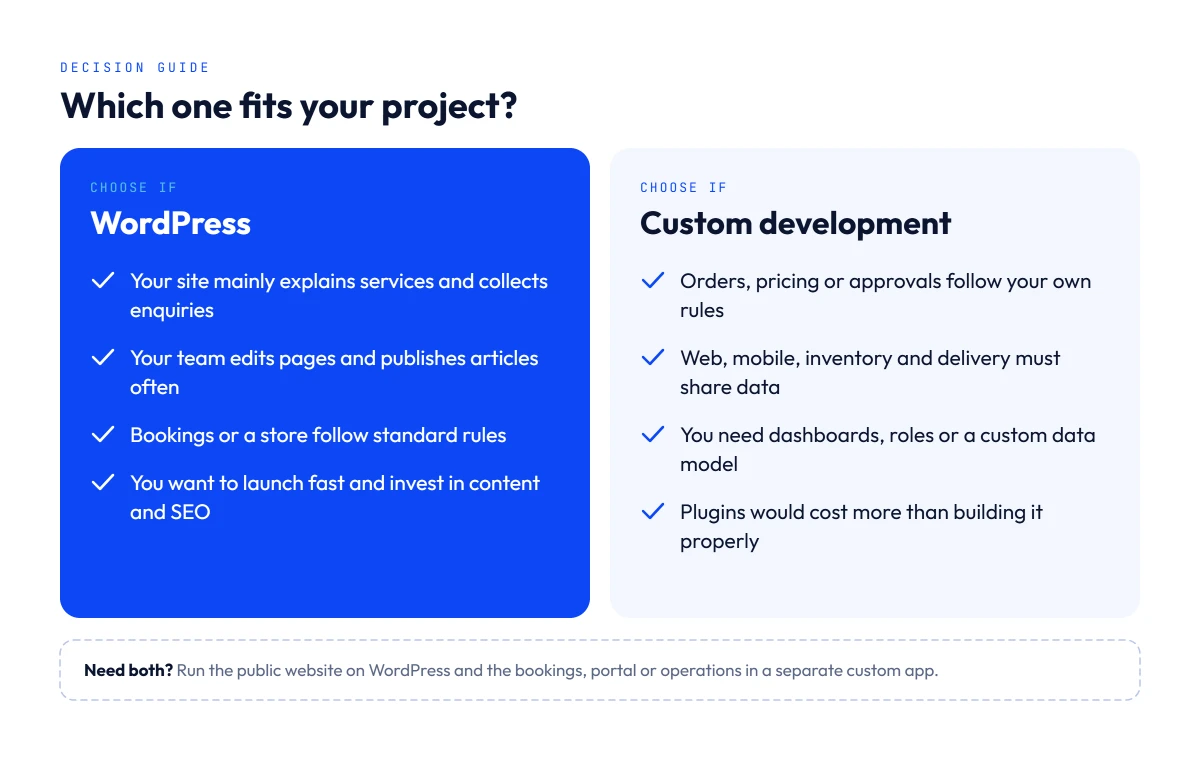
WordPress is often the sensible choice when the primary purpose of your website is to explain your offer, earn trust and generate enquiries. It is especially useful if your team needs to publish new pages without calling a developer for every change.
- You need service pages, case studies, a company blog, location pages or campaign landing pages.
- You want a lean website with tailored branding, editable content and good technical SEO foundations.
- Your shop or booking flow can be covered reliably by WooCommerce, a mature integration or a modest custom extension.
- Your team needs predictable publishing and a manageable maintenance routine.
- You would rather spend more of the initial budget on content, SEO and customer acquisition than on infrastructure.
A custom-coded WordPress theme can deliver a distinctive design without relying on a large stack of plugins. The implementation should still include updates, backups, form security, caching, image optimisation and access control. “Built on WordPress” is not itself a guarantee of speed, security or search performance.
When custom development is worth the investment
Custom development makes sense when the software itself becomes part of how the company operates or competes. The deciding factor is usually the complexity of the business logic, not the mere presence of a login form or payment button.
- Orders, pricing, permissions or approvals follow rules that change by merchant, user, location or contract.
- Web and mobile applications share real-time information with inventory, delivery, accounting or external APIs.
- Your product needs a specialised dashboard, data model, reporting layer or customer journey.
- The cost of forcing the workflow into multiple plugins exceeds the cost of a purpose-built solution.
- You need a clear development roadmap with controlled releases, testing and integrations.
Custom does not automatically mean faster, more secure or better for SEO. Those qualities depend on architecture, hosting, implementation and ongoing engineering. The benefit is that the system can be designed around your actual business process instead of adapting that process to a plugin.
The hybrid option: do not ignore it
Many growing businesses can avoid an unnecessary all-or-nothing decision. Three common patterns work well:
- Custom-theme WordPress: retain the familiar editor and publishing workflow, while creating original layouts and a small number of custom features.
- WordPress plus a separate app: use WordPress for the public website and organic content; run bookings, partner portals or operations in a dedicated custom application.
- Headless WordPress: manage content in WordPress and deliver it through a separate front end, with the extra development and deployment work this requires.
For example, a clinic might start with a WordPress marketing site and a simple appointment system. If it later needs patient-specific portals, multiple branches and deep operational integrations, those features can be handled by a separate system without replacing the public website.
WordPress vs custom website costs in the UAE
The cost comparison is real, but an honest quote depends on what is being built. A five-page company site, a multilingual WooCommerce store and a platform connecting suppliers, customers and drivers cannot be priced using the same “cost per page” formula.
| Scope | Usually affects price | Plan for |
|---|---|---|
| WordPress business website | Unique design, page types, languages, forms, content migration | Theme build, hosting, content, analytics and updates |
| WordPress with custom functionality | Custom fields, workflows, integrations, maintenance of bespoke code | Development, plugin licensing, testing and support |
| Custom business platform | Roles, APIs, data model, payments, complex rules, mobile integration | Discovery, UX, development, infrastructure, QA and ongoing iterations |
Standard WordPress projects can take weeks; more specialised products commonly require a longer discovery and build cycle. Ask for a milestone-based scope that identifies what is included, what is excluded and what happens when requirements change.
For reference, a WordPress business website at Blue Tech typically costs AED 1,500 to 6,000, depending on the number of pages, features and content, while custom platforms are quoted individually after a short discovery. For a fuller breakdown by website type, read our guide to business website costs in the UAE.
Compare the total cost of ownership over the first 12–24 months: initial build, hosting, paid extensions, maintenance, security fixes, backups, future features and the time your staff spend operating the system. A lower quote can be the more expensive choice if it leaves critical work out.
Is WordPress or custom development better for SEO?
Neither platform has an automatic ranking advantage. Google needs useful content, accessible pages, sound internal linking and a positive experience for users. WordPress plugins can help manage title tags, canonical URLs, sitemaps and structured data. A custom site can deliver those capabilities too, but they need an owner in the technical specification and quality-assurance process.
For custom sites built with JavaScript frameworks, do not assume that a modern interface is automatically search-ready. Check whether important content and links are accessible in the rendered page, whether metadata is generated for every route, and whether Google can discover and index key URLs. Server-side rendering or pre-rendering may help depending on the application.
Further reading: Google Search Central — JavaScript SEO basics and creating helpful, people-first content.
A practical SEO acceptance checklist should include crawlable navigation, page-specific titles and descriptions, canonical URLs, XML sitemaps, redirects, valid structured data where relevant, indexability checks, analytics and real mobile performance tests. This applies whether the website runs on WordPress, Laravel, Next.js or another stack.
What matters for companies in Dubai and the UAE?
Local requirements can change the answer. A business serving both Arabic- and English-speaking customers should plan content ownership, translations, RTL layouts, navigation and the relationship between language versions before selecting a platform. Search-friendly language URLs and correctly configured hreflang can matter more than the choice of CMS.
For e-commerce or service bookings, clarify the payment provider, currency, tax and invoicing flow, and any required third-party integrations. For businesses with multiple branches or teams, define permissions and reporting early. The platform is only a good fit if your staff can operate it reliably after launch.
Two Blue Tech examples: choosing around the workflow
SixGuides — tourism and digital advertising platform. The solution brings together a website, mobile app, merchant and representative interfaces, QR-enabled discovery and platform administration. These interconnected workflows explain why a custom application architecture can be justified beyond a conventional marketing website. See the SixGuides project
XO Fashion — commerce and logistics. Blue Tech developed web and mobile experiences connected to inventory, shipping, delivery teams and administration. The important requirement was not simply selling products online; it was coordinating operations across several systems. See the XO project
These projects show how the scope of a company’s workflow can shape the technology decision.
A five-question decision test
| Ask this before requesting a quote | What the answer suggests |
|---|---|
| 1. Is the primary goal to publish content and get enquiries? | Start by assessing WordPress. |
| 2. Are bookings, payments or accounts mostly standard? | Check a secure, supported WordPress solution first. |
| 3. Are workflows deeply customised or linked across departments? | Evaluate custom development or a hybrid. |
| 4. Who edits content and maintains the system after launch? | Define editorial access, support and ownership upfront. |
| 5. What changes are likely in the next 2–3 years? | Plan integration boundaries and a realistic roadmap now. |
When you brief a development company, bring the actions users must complete, the staff roles, the systems to connect, the languages required, and an initial budget range. You will get a more useful proposal than by asking simply for a “WordPress price” or a “Laravel website”.
Mistakes that make either option expensive
- Choosing a platform before writing down the core business requirements.
- Treating a login, checkout or booking button as proof that a full custom build is required.
- Adding multiple overlapping plugins without checking performance, security and long-term support.
- Building a custom website without clear responsibilities for content editing, SEO and maintenance.
- Assuming the provider automatically transfers all source-code rights, domains, accounts and licences. Confirm these in the contract.
- Comparing only launch quotes instead of total ownership costs and future change requests.
How Blue Tech helps you make the choice
Blue Tech designs business websites and builds custom web and mobile applications. We begin with the actions your customers and team need to complete, then assess whether a lean WordPress build, custom WordPress features, a dedicated platform or a hybrid solution fits the scope.
See our Business Website Development service and Custom Web Applications service.
Not sure which option is right for your project? Tell us what you need the website to do. We can review the requirements and outline a suitable approach and initial budget considerations, without committing you to a build.
Frequently asked questions
Is WordPress professional enough for a business website?
Yes. A well-built WordPress site can support professional design, multilingual pages, SEO, content publishing, forms and even e-commerce. Its suitability depends on requirements and implementation quality, not its popularity.
Is WordPress or custom development better for SEO?
Neither automatically ranks better. Content quality, site architecture, indexability, speed, internal linking and technical execution matter more. On custom projects, SEO requirements should be defined before development.
Can WordPress handle user accounts, payments and bookings?
Yes, often through core features, established extensions or custom plugins. The question is whether those options cover your rules reliably and remain practical to support as the business grows.
What is the difference between WordPress and Laravel?
WordPress is a CMS with publishing and administration already provided. Laravel is a PHP application framework used to build custom features and back-end systems. They solve different kinds of problems and can also work together.
Can I launch on WordPress and add custom software later?
Yes. A company can keep WordPress as its marketing and content website while adding a custom portal or app for complex operations. Plan shared data, authentication and integrations before expanding.
Which is cheaper to maintain?
WordPress can make routine content updates easier, but plugins, hosting and bespoke code still require upkeep. Custom systems need software maintenance, infrastructure monitoring and testing. Compare the full operating plan.


One thought on “WordPress vs Custom Development: Which Is Right for Your Business? (2026 Guide)”
Comments are closed.